
1

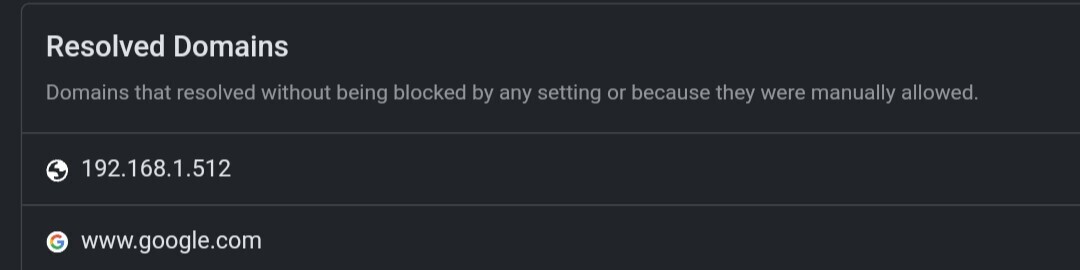
How is there an IP address in Resolved domains?

DNS isn't supposed to touch IPs. But I can see the IP "192.168.1.512" in Resolved domains in the analytics tab. The weird thing is, it doesn't appear in the logs, only in Resolved domains.

Also it's making like 1000 queries per 5 minutes, so my free quota is being eaten up fast.

Is this a bug? If no, can anyone tell me what is going on and how to stop it?
 

9 replies

null
    • R_P_M
    • 3 wk ago
    • Reported - view

    I've no idea of the root cause but that IP isn't a valid one. 255 is the maximum valid number for each.

      • IsHacker
      • 3 wk ago
      • Reported - view

      Just found that it appears only when I use the DNS on my router. If I change it back to something like cloudflare in the router settings, the requests stop too.

      • R_P_M
      • 3 wk ago
      • Reported - view

       Where are you setting DNS in the router settings, is it in WAN or DHCP?

      • IsHacker
      • 13 days ago
      • Reported - view

      I set it in WAN.

      • R_P_M
      • 13 days ago
      • Reported - view

       Please try setting it in the DHCP section, if that is possible. Sometimes there are issues setting it on the WAN.

      • IsHacker
      • 13 days ago
      • Reported - view

      I already tried that, but the router firmware is buggy. It always uses the DNS I set in WAN, and not the DHCP one.

    • entrepreneur, academic educator
    • Erwin
    • 3 wk ago
    • Reported - view

    This is a local address if the IPv4-address starts with 192.168.
     

    • IsHacker
    • 12 days ago
    • Reported - view

    Solved. Apparently it was caused by DDNS (which I actually needed to update the IP in NextDNS). After deactivating DDNS in the router settings and rebooting the router, the requests are gone. For now I'm manually linking the IP from the dashboard, every time the router reboots.

    BTW How do I close this bug report or mark it as solved?

      • R_P_M
      • 12 days ago
      • Reported - view

       Glad you got it sorted, sort of at least.

      There is no way as a normal forum member to mark this thread as solved, unfortunately. It would have to be done by NextDNS Staff but since they’re not often here it would be best just to leave it. 

      Edit: typo

Content aside

  • Status Solved
  • 1 Votes
  • 12 days agoLast active
  • 9Replies
  • 125Views
  • 3 Following