
NextDNS high CPU usage

I use the latest stable version of NextDNS app on my Windows 10 laptop which is version (3.0.12-2-6g48bdf4) but every few days I notice that my laptop's fan start running loud & very fast indicating that there is high CPU usage even though I was just browsing the internet or watching an online video & I find in Windows Task Manager that NextDNSService is the one that causes this high CPU & power usage as you can see in attached screenshot & when I try to disable NextDNS app I find that it is unresponsive & can't even quit it unless I use Task manager to end NextDNSService but after that if I opened NextDNS app again it won't work and I have to restart the Windows & I tried uninstalling NextDNS app then re installing it but it didn't fix this problem & I couldn't detect what causes this problem as it occurs at random times so can you help me ?
10 replies
-
Same problem here, still waiting for fix https://help.nextdns.io/t/x2h0l0a/windows-service-process-running-high-cpu
-
same here, latest nextdns app on latest windows 11. Had to deinstall any manually set the ip via settings.
-
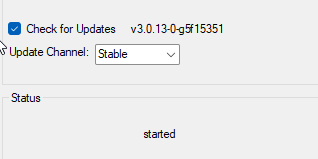
Kill the job for the taskmanager.
Restart the service form service.msc.
Check that you at running v.3.0 an status is started
-
Is it possible that if the router gets a new IP address, this somehow conflicts with the service on a local computer. It just looked that way yesterday.
-
Very old thread but updating because I'm having the same issue so it seems to have never been resolved. Also on Windows 10. I noticed that a CPU-intensive game was chugging much more than useful, checked resources, saw NextDNS spiking very high.
The instructions for manually setting up NextDNS are harder to follow for W10 so I think W11 must have changed the settings app. I'll probably need to give YogaDNS a shot I guess. I know that W10 is old but I do imagine a lot of computers still run it.

Content aside
-
1
Votes
- 5 days agoLast active
- 10Replies
- 1029Views
-
6
Following