1

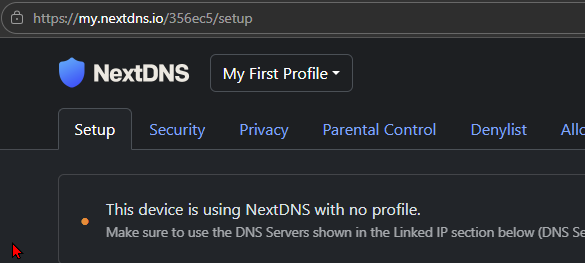
DoH, but still "This device is using NextDNS with no profile"

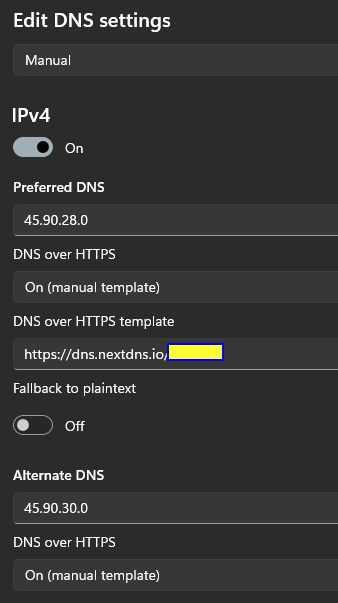
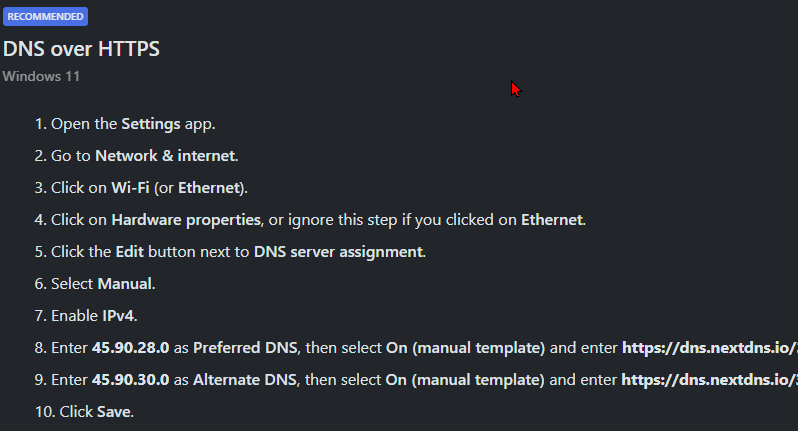
Windows 11, Dns-over-Http is configured as instructed.


However, I still get
7 replies

null
    • R_P_M
    • 2 days ago
    • Reported - view

    Try using the IPv4 addresses listed in linked IP instead of the ones ending with ".0" shown in the instructions. (they should be just a different number at the end, to replace the zero)

      • RAJIV_DELWADIA
      • 2 days ago
      • Reported - view

      Using those servers (*.34) over DoH (I didn't know they would support it) works, at least for now.

      But then agian, I have also linked my current IP address, so I can't tell if it's the DoH template or just the IP linking that is taking effect.

      • R_P_M
      • yesterday
      • Reported - view

       Check the analytics and the section mentioning "Encrypted DNS". The IP linked traffic will be unencrypted, so anything less than 100% in that section will tell you how much is split between DoH and IP linked requests.

      • RAJIV_DELWADIA
      • yesterday
      • Reported - view

       Thanks. It shows about 23% encrypted. But since I have multiple devices, including Android Private DNS (which is not encrypted, AFAIK), I don't see how this metric alone helpa me isolate how my Windows laptop is getting my NextDNS profile used.

      • R_P_M
      • 22 hrs ago
      • Reported - view

       Actually Android’s private DNS feature is encrypted DNS, it uses DoT.

      You could just copy your current profile and make a new configuration profile just for your Windows laptop. That would show you exactly the numbers for DoH connection. 

      • RAJIV_DELWADIA
      • 7 hrs ago
      • Reported - view

       Ah excellent idea.

      OK, I've created a profile for just this laptop. I've set my DNS to

      • DoH
      • use this profile's template
      • but using the servers for "linked IP"
      • and have not linked my IP.

      Now the status says

      This device is using NextDNS with no profile.
      Make sure to link your IP address in the Linked IP section below.

      Indicating that the DoH template is not choosing a profile.

      If I switch to the *.0 servers listed in the DoH section, the status changes back to

      This device is using NextDNS with no profile.

      Make sure to use the DNS Servers shown in the Linked IP section below (DNS Servers change between profiles).

    • losnad
    • 6 hrs ago
    • Reported - view

    It might be an issue with the browser.

    If you use a chromium one try either to disable secure DNS or set it to custom and put the DoH instructions from the setup page. 

    Try with another browser, maybe Firefox. You might still need to set up the DNS over Https to either Off or Increased Protection or Max Protection both with the custom option and your link from the Setup page instructions. 

Content aside

  • 1 Votes
  • 6 hrs agoLast active
  • 7Replies
  • 49Views
  • 2 Following