
iOS 26 / 26.0.1 - No or slow DNS on cellular
Hello,
after I installed iOS 26 on my iPhone 14 Pro, DNS requests for installed NextDNS app in mobile became extremely slow or broke off with timeout. Uninstalling of the app and setting up a NextDNS profile also did not solve the problem.
There were no problems in the WLAN.
Also, a reset of the network settings and a restart of the mobile phone did not bring a solution.
Even after switching to an iPhone 17 Pro, the problem was reproducible. With other DNS profiles, e.g. Mullvad, it works without problems.
Even use without private relay has not brought any improvement.
iOS 26.0.1 also not.
I tested all this in the network of Deutsche Telekom and Vodafone. To my knowledge, both networks rely entirely on IPv6.
My landline is also natively IPv6, but the problem does not occur in the WLAN via it.
The issue does not occur on an iPhone 13 Pro with iOS 18.x.
Is anything known that Apple has changed anything in the current versions that can trigger this behavior? And if so, how can I solve the problem?
Greeting
Wutti
13 replies
-
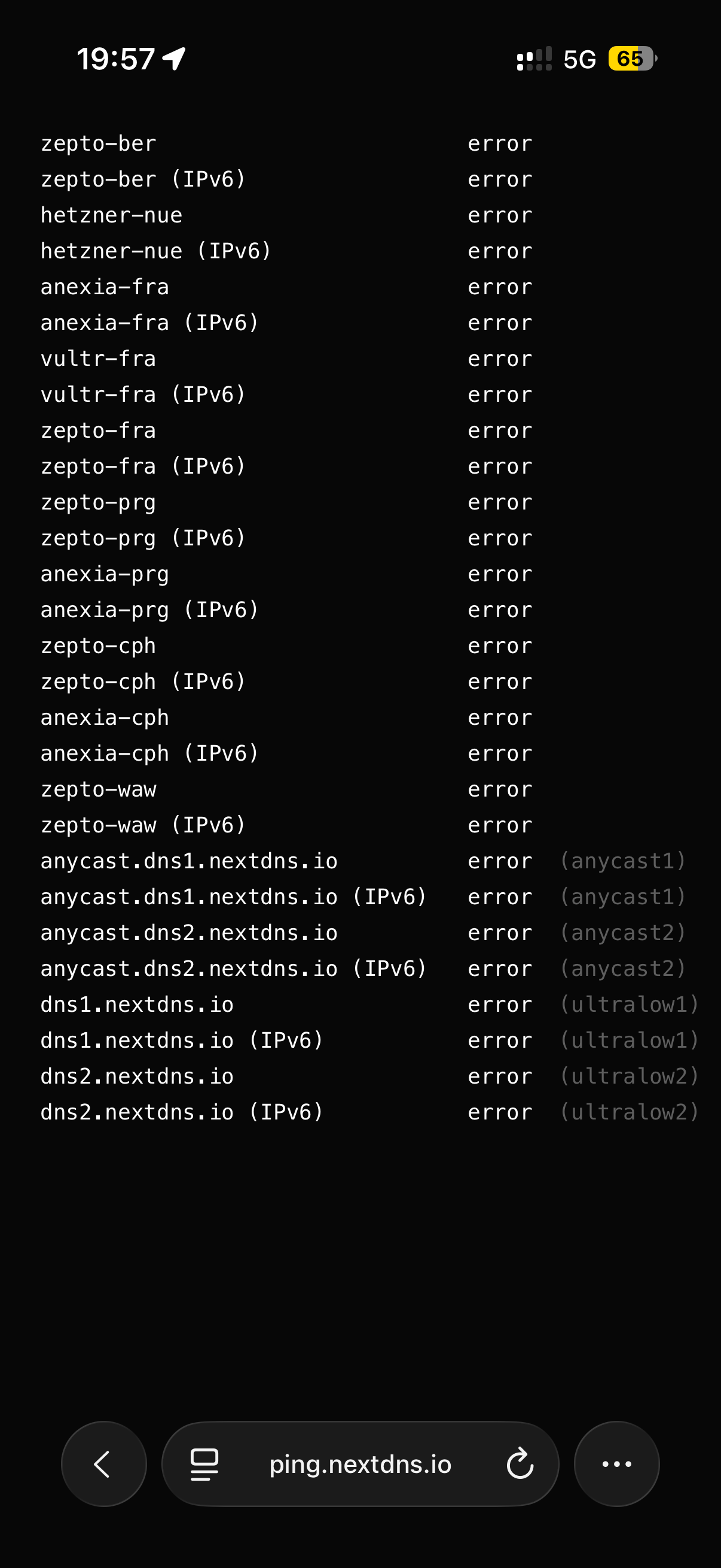
Ok, if I try the check on ping.nextdns.io without any profile in cellular network of Telekom Germany, there are only errors.
So option 1, Telekom and Vodafone blocks NextDNS, option 2 Apple blocks NextDNS. But with activated Private Relay, there are the errors in the check. Without Private Relay there is a blank site on ping.nextdns.io.
I‘m very confused
-
ok, I found the error. Using the standard APN settings for Deutsche Telekom mobile on iPhone with iOS26 uses IPv6 only.
After switching the APN settings to IPv4, DNS over NextDNS works without problems.
But... This is only a workaround. IPv4 is not a solution. So NextDNS should check why IPv6 isn't working and fix this problem.
-
But it‘s curious that the IPv6 connection problem is not available on landline. Only on cellular.
-
No one else with this problem? And no idea from the developers?
-
Ok, next new information. Activated Private Relay with generic location instead of country and timezone and APN internet.v6.telekom works.
Spooky
-
Similar problem here.
Also the same configuration, but APN internet.telekom (IPv6) behaves the same as APN internet.v4.telekom (IPv4).
On iPhone (iOS 26.4):
The first page load in Safari takes up to 10 seconds.
Subsequent page loads are fast.
First page loads in brave or edge are fast immediately.
First page loads in Safari with a manually created profile are fast, too.
On MacBook Air (MacOS 26.4):
Page loads are fast, no impact at all.
It seems that it's only slow in the browser-engine and in apps that use the browser-engine (e.g. NetNewsWire).
Apps itself load content fast.
could you check if it's similar behaviour at your side ? -
To compare the behaviour i just created a controld test-account.
I wanted to cross-check if it might conflict with iOS.
Using APN internet.telekom (IPv6).
On iPhone (iOS 26.4):
The first page load in Safari loads immediately.
The rest of the tests results are identically.Do we have a known issue here ?
-
I don't have this problem as I don't use IPv6. However, could it be because Safari uses Private Relay and there is some problem with Private Relay on IPv6. ControlD blocks iCloud Private Relay entirely. According to ControlD docs, they block the domains: mask .icloud. com and mask-h2 .icloud. com (NB: I've had to enter spaces to get around the forum restrictions imposed on me). Maybe try blocking these in NextDNS and see if it solves the problem. There is more information on Private Relay domains and NextDNS if you search for "yokoffing" Github NextDNS guide (sorry I can't link to it as I'm restricted in posting URLs).
-
I extended my tests to 6 iOS devices.
The status now is different - all devices behave the same, except from one:
iCloud private relay is disabled on all devices.
ControlD and NextDNS behave the same way - so there does NOT necessarily be an issue with NextDNS.
On iPhone (iOS 26.4):
The first page load in Safari takes up to 10 seconds.
Subsequent page loads are fast.
First page loads in brave or edge are fast immediately.
On MacBook Air (MacOS 26.4):
Page loads are fast, no impact at all.Perhaps it's some changes in iOS / webkit ?
What works on 5 iOS devices (out of 6):
creating a new Safari profile changes the game.The first page load in Safari are fast - but only with the newly created profile.
-
Yes, Limit IP Tracking is deactivated
-
I’ve now had a long and detailed conversation with a higher-level Apple Support department.
They told me that there are some internal reports on this issue, but no detailed knowledge about it yet.
We compared these statements with our own test results.After that, we developed a plan for how to narrow down the errors.
In the meantime, I tested the whole thing once with a “new” device that was still running iOS 26.1.
I installed a DoH profile and tested Safari with an IPv6 APN.
There were no problems — normal speed.
Then I updated to iOS 26.4 and tested again — still no problems, normal speed.This suggests that the issue is related to the update, which occurs on 5 out of 6 existing devices.
After several additional tests according to the plan mentioned above, the following solution was found, which reproducibly fixes the problem on all 5 affected devices:
1. Completely reset Safari (Settings → Apps → Safari)
- Disable all extensions (in all profiles)
- Delete all (additionally created) profiles
- Clear history and website data (“All History” and “Close All Tabs”)
- Quit Safari (if not already done)2. Restart Safari once with the existing DoH profile
- Speed should now be normal3. Reconfigure Safari
- Re-enable desired extensions
- Recreate preferred profiles4. If “iCloud Private Relay” functions were disabled, they can be reactivated as needed:
- Settings → “Profile” → iCloud → “Private Relay” → enable
- Settings → Wi-Fi → “SSID” → “Limit IP Address Tracking” → enable
- Settings → Apps → Safari → “Hide IP Address” → enable for “Trackers and Websites” or “Trackers Only”If these changes don’t help, reset the network settings:
- Settings → General → Transfer or Reset iPhone → Reset → Network Settings
(This has broader effects: Wi-Fi networks, Bluetooth connections, etc., need to be reconfigured.)It’s likely that these issues are related to the update and the changes to “Happy Eyeballs” and the “WebKit engine.”
I wish you good luck!
Everything’s working perfectly for me again.Happy Easter!
-
This feels like it’s the same problem. I’ve been having with excessive latency on both of my iPhone 16 pros. First request always hangs - repeated requests - 3 or 4 retires - clears the latency and subsequent requests respond fine for a (indeterminate) time.
I have the same issue whether I’m on my Wi-Fi network at home or on cellular. However, it is very difficult to consistently reproduce because after repeated requests the latency clears up. So, troubleshooting becomes difficult, because what appears to work may have made a change or, it may have just triggered repeated requests which also cleared the latency.
At this point, I have performed the full reset of network settings, removed all Safari configs and extensions, and disabled private relay. That all seemed to work for a while, but today my latency has returned. Oddly, this isn’t seen on Opera or DuckDuckGo browser.
Content aside
-
1
Votes
- 6 hrs agoLast active
- 13Replies
- 735Views
-
6
Following