
1

NextDNS Profile Not Applying on Windows 11 and Chrome Secure DNS Blocked
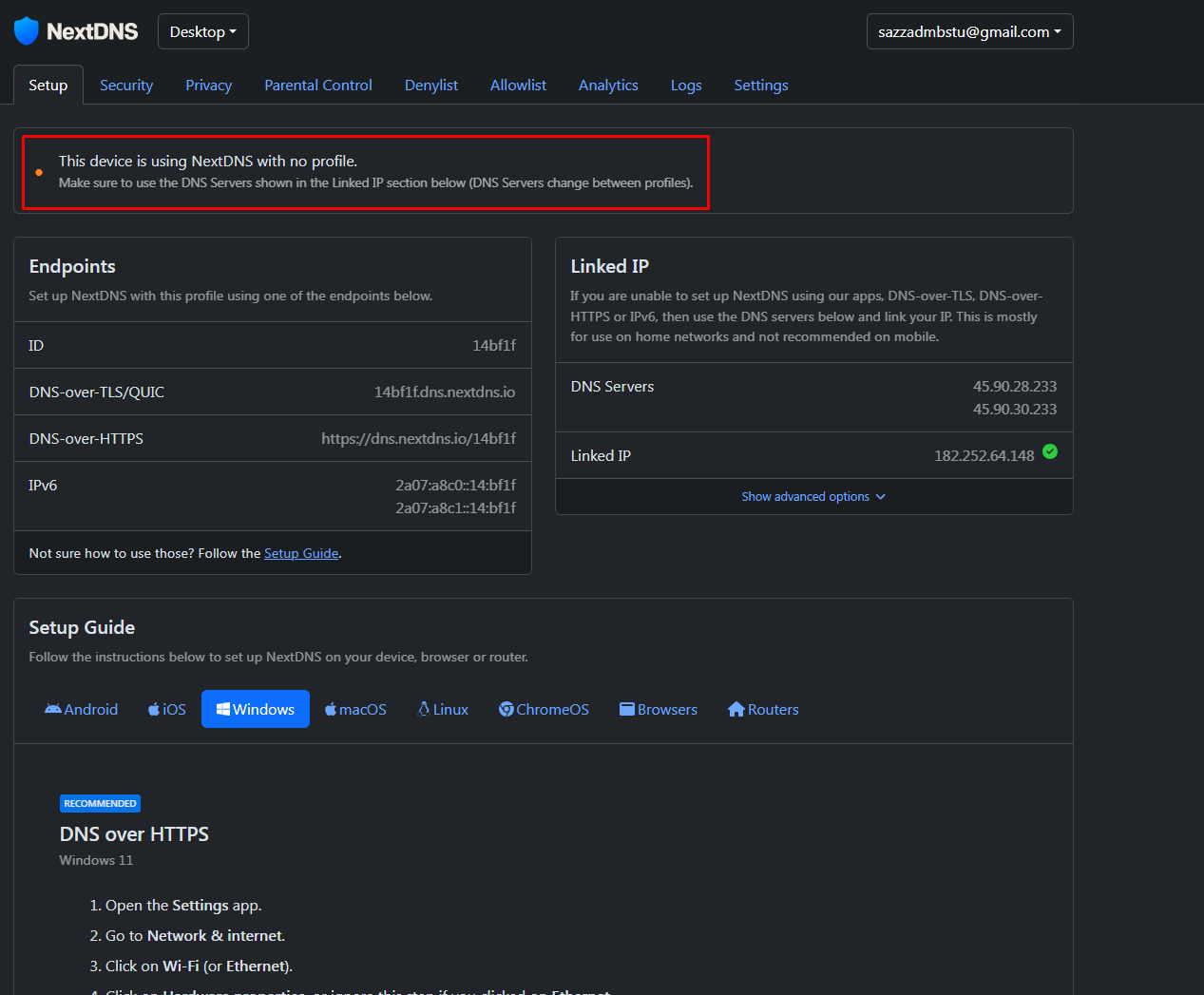
Dear NextDNS Community,

I need assistance with a NextDNS configuration issue on my Windows 11 device.

I am a paid NextDNS subscriber with a 1-year subscription. I have followed all the recommended instructions and applied the DNS settings, but the device is still showing:

“This device is using NextDNS with no profile. Make sure to use the DNS Servers shown in the Linked IP section below. DNS Servers change between profiles.”

I also tried configuring Google Chrome as instructed, but Secure DNS is not working. The Secure DNS option is blocked and Chrome shows:

“Your browser is managed by your organization.”

However, according to our organization, they have not applied any browser management policy or control on my Chrome browser.

Could anyone please advise how I can resolve this issue and correctly link my Windows 11 device and Chrome browser to my NextDNS profile?

Thank you in advance for your support.


Best regards,

Sazzad Kabir

Email: sazzadmbstu@gmail.com

6 replies

null
    • jroks123
    • 10 days ago
    • Reported - view

    In your first image, checked Linked IP. Under DNS servers put in 233 instead of 0. The 0 is strictly the default address.

      • Sazzad_Kabir
      • 9 days ago
      • Reported - view


      Now I have connected it, but I’m facing a new problem. I can’t access our official system site: https://eservice.waltonbd.com/.

      The site works smoothly without NextDNS, but when I use NextDNS, it stops working.

      Can you suggest how I can access it while keeping NextDNS enabled?

      • jroks123
      • 2 days ago
      • Reported - view


      The issue appears to be with the site’s DNS configuration itself, not NextDNS directly.

      Some DNS resolvers (including NextDNS) are stricter about malformed DNS records. The site’s SOA serial appears invalid/future-dated, which may cause resolution failures.

      Since the site works without NextDNS, your ISP DNS is probably tolerating the bad configuration while NextDNS is rejecting it.

      Short-term options:
      - temporarily disable NextDNS for that site
      - use a different DNS profile/device
      - try disabling DNSSEC in NextDNS

      Long-term fix:
      - the site administrator needs to correct the DNS zone configuration.


      Specifically correcting the SOA Serial Number

      • Sazzad_Kabir
      • yesterday
      • Reported - view


      Dear NextDNS Support,

      Thank you for your response regarding the Android Private DNS setup.

      However, my issue is no longer related to Android configuration. The DNS setup is already correctly configured and working for other websites and services.

      The specific problem is that the following site does not work when using NextDNS:

      https://eservice.waltonbd.com/

      The site works normally when I disable NextDNS and switch back to my ISP DNS. This clearly indicates that the issue is related to how NextDNS validates or resolves the domain.

      You mentioned that the domain may have an invalid or future-dated SOA serial / DNS configuration issue. If that is the case, I need a practical, user-friendly workaround from NextDNS rather than generic setup instructions.

      Please provide a simple and proper solution for this domain specifically, such as:

      • How to allow or bypass this domain inside NextDNS

      • exact Allowlist configuration required

      • whether DNSSEC must be disabled

      • whether a rewrite or exception rule is needed

      • whether there is a recommended custom configuration for this domain

      I am a paid NextDNS subscriber, and I need a usable solution to access this business-critical Walton service while continuing to use NextDNS protection.

      Please provide clear step-by-step instructions specifically for:

      https://eservice.waltonbd.com/

      instead of the general Android DNS setup documentation.

      I would appreciate a proper technical resolution or workaround configuration.

      Best regards,

      Sazzad Kabir
      sazzadmbstu@gmail.com

      • jroks123
      • 9 hrs ago
      • Reported - view


      Just to clarify, I’m not NextDNS staff/support — I’m also just a customer/community member sharing what I know from working around this kind of stuff. I don’t mind helping point people in the right direction, but this is still a community forum, not an official support channel.

      If someone wants me actively troubleshooting, testing, reproducing issues, and owning the problem end-to-end, then we’ve officially crossed into contractor territory and somebody better call legal for paperwork, beach house approvals, and an unnecessarily expensive sports car clause. 🤣


      That said, as a paying customer, you’ll need to reach out to NextDNS support directly for official troubleshooting/escalation since this is ultimately a community help-base forum.

      • Sazzad_Kabir
      • 2 hrs ago
      • Reported - view


      I already understood the meaning of “NextDNS Help Center” before applying. Your suggestion was unnecessary, as I did not ask for assistance or clarification.

      Also, I would like to know your role here. Are you a community administrator or simply a regular user? Please maintain appropriate boundaries when responding to others.

      Thank you.

Content aside

  • 1 Likes
  • 2 hrs agoLast active
  • 6Replies
  • 133Views
  • 2 Following